2021 · Software Developer Intern
Creating Easynote’s desktop application
An Electron desktop application, alongside web improvements and the start of a mobile application.
- Electron
- Vue
- React Native
How it fits together
Bring the product to the desktop.
Explore the architecture, then open a decision below.
-
Desktop
Electron application
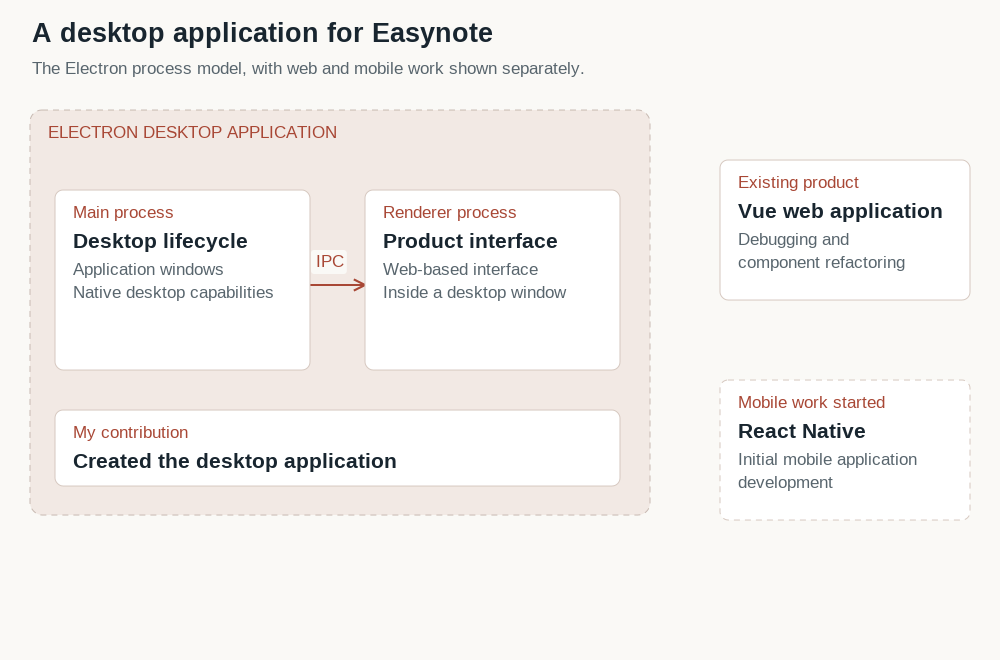
Created the desktop application for Easynote.
Design reasoningElectron brings a web-based product interface into a desktop application. The diagram shows its standard process boundaries.
-
Application boundary
Main and renderer
Separate desktop lifecycle from the interface.
Design reasoningElectron’s main process manages the application and windows; the renderer runs the web interface.
-
Web
Improve the existing app
Vue debugging and component refactoring.
Design reasoningThe web work focused on performance and maintainability of the existing application.
-
Mobile
Development started
Started the React Native mobile application.
Design reasoningMy mobile contribution was the initial development work during the internship.
Simplified architecture and design considerations. Internal endpoints, access policies and deployment details are omitted.
My contribution
Created the Electron desktop application, improved the Vue web application and started the React Native mobile application.
Result
A desktop application for the product, with mobile development started during the internship.
Scope
Internship: November 2020 to February 2021. Easynote has continued to evolve since this work.
Technical context: Electron’s process model.